
Remittance Reports
View payment remittances and reconcile health fund deposits in Billumbra
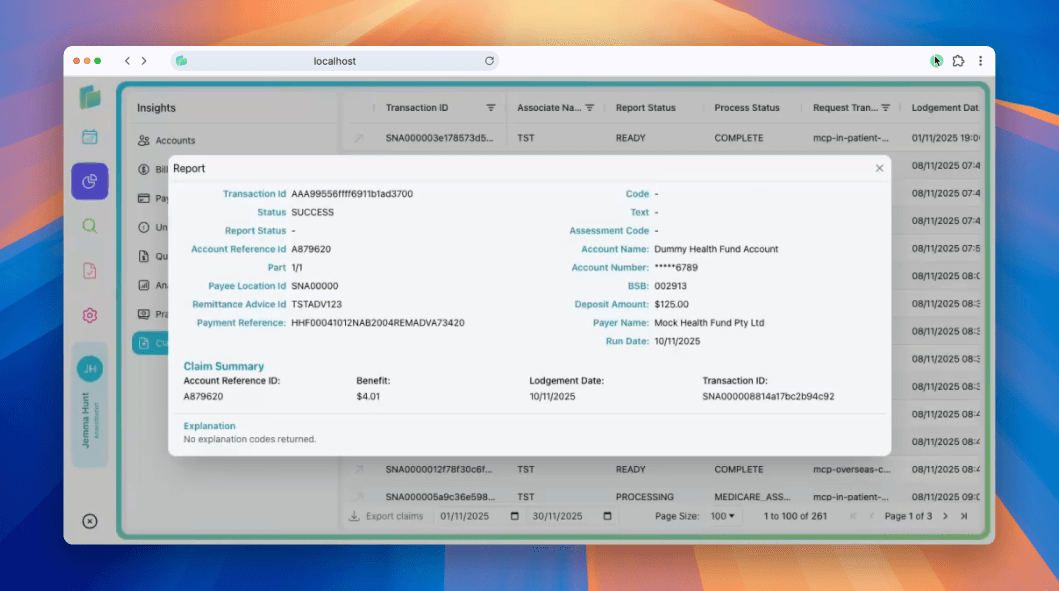
Individual remittance report
Remittance dashboard
Navigate to the Insights > Claims section in the left sidebar then filter by mcp-eclipse-remittance-advice to see all remittances in a filterable table.
Dashboard columns
| Column | Description |
|---|---|
| Transaction ID | Unique remittance identifier:click to view the full report |
| Associate Name | Practice or billing group name |
| Report Status | READY, COMPLETE, or PROCESSING |
| Process Status | Assessment state (e.g., COMPLETE, MEDICARE_ASS...) |
| Request Transaction | Internal request reference |
| Lodgement Date | Date and time the remittance was received |
Filter and export remittances
- Date range filter: Set start and end dates to view remittances from a specific period (e.g., 01/11/2025 to 30/11/2025)
- Export claims: Download remittance data
- Page size: Adjust how many remittances display per page (e.g., 100)
- Pagination: Navigate through multiple pages of results (e.g., Page 1 of 3)
Filter by date range to match your bank statement period, making it easier to reconcile deposits.
View Remittance Report
Click any remittance in the dashboard to view the detailed payment advice. This shows all information about a single payment run.
Report header
| Field | Description |
|---|---|
| Transaction ID | Unique identifier for the remittance (e.g., AAA98956fff6031b1ad3700) |
| Status | SUCCESS confirms the remittance was retrieved successfully |
| Code | Payment status code (typically - for successful payments) |
| Text | Additional status information |
| Report Status | Current state of the remittance report |
| Assessment Code | Final assessment outcome |
Payment details
| Field | Description |
|---|---|
| Account Reference ID | Your internal reference number (e.g., A879620) |
| Account Name | Practice bank account name |
| Part | Payment part identifier (e.g., 1/1 for single payment) |
| Account Number | Practice bank account (last 4 digits shown, e.g., ****D789) |
| Payee Location ID | Your practice location identifier (e.g., SNA00000) |
| BSB | Bank state branch code |
| Remittance Number | Health fund remittance reference (e.g., TSTAD12) |
| Deposit Amount | Total amount deposited to your account |
| Payment Reference | Unique payment identifier from the health fund |
| Payer Name | Health fund name (e.g., Mock Health Fund Pty Ltd) |
| Run Date | Date the payment was processed |
Claim summary
For each claim included in the payment run:
| Field | Description |
|---|---|
| Account Reference ID | Your internal claim reference |
| Benefit | Amount paid by the health fund for this claim |
| Lodgement Date | Date the original claim was submitted |
| Transaction ID | Unique claim transaction identifier |
Explanation section
Shows any explanation codes or notes from the payment processor. Common messages:
- "No explanation codes returned" : Payment processed without issues
Use the Transaction ID to cross-reference remittances with your original claims and confirm all services were paid correctly.
Understanding remittance statuses
Report status
READY: Remittance received and ready to viewCOMPLETE: Fully processed and reconciledPROCESSING: Still being matched to claims in your system
Process status
COMPLETE: All claims in the remittance have been matched and reconciledMEDICARE_ASS...: Medicare assessment in progress- Partial statuses: Some claims may still be processing
If a remittance shows PROCESSING for more than 24 hours, check that all referenced claims exist in your system. Missing claims may prevent automatic reconciliation.
Reconciling payments
Use remittance reports to match deposits in your bank account:
- Check the run date: Match this to the deposit date in your bank statement (usually 1-2 business days later)
- Verify the deposit amount: Confirm the total matches what arrived in your account
- Review the claim summary: Ensure all claims were paid the expected benefit amount
- Cross-reference transaction IDs: Link remittances back to original claims if you need to investigate discrepancies
Export remittances by date range and import into your accounting software to automate reconciliation workflows.