
Add or Edit Anaesthetists
Update anaesthetist profiles, billing details, and schedules in Billumbra
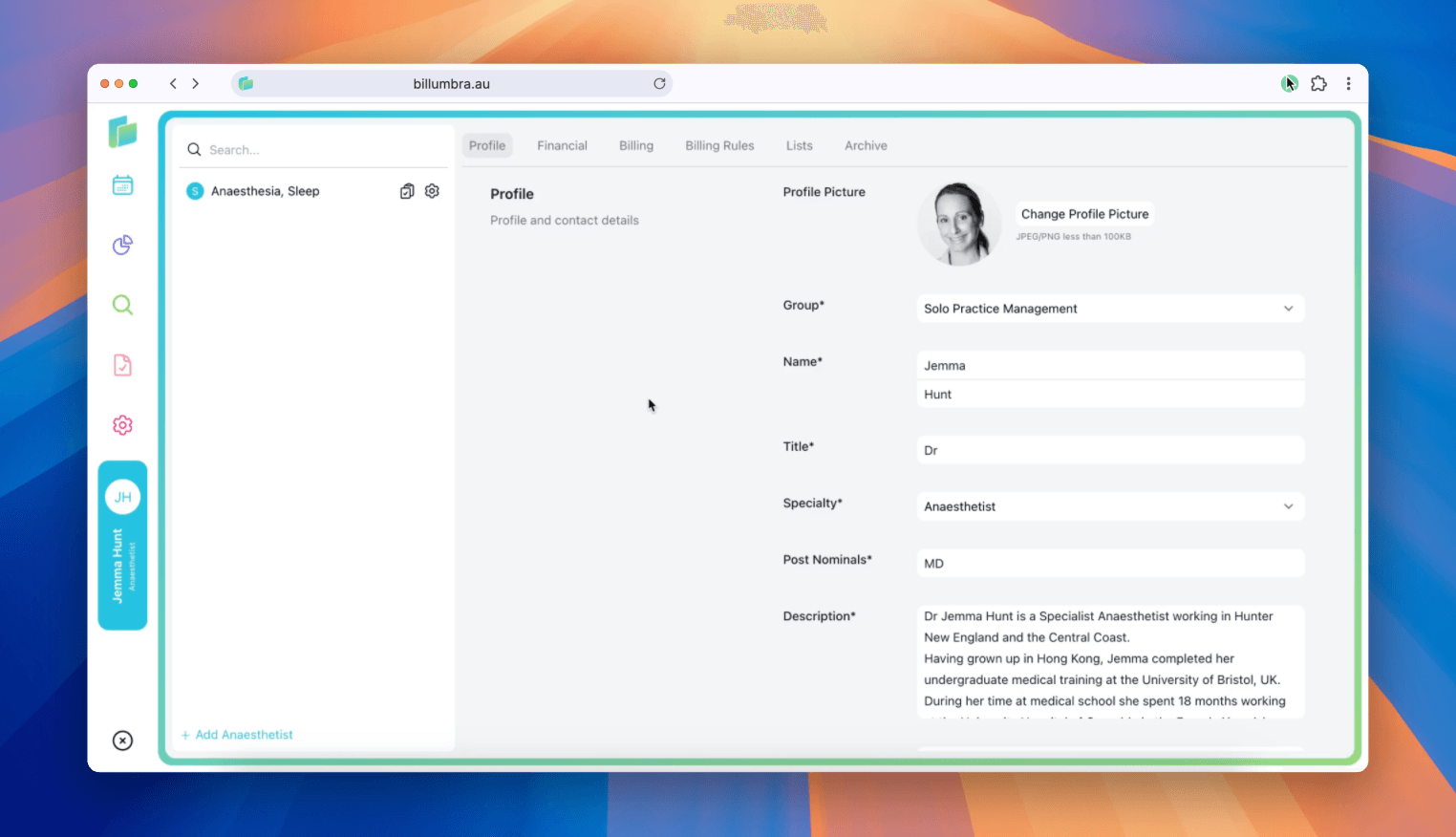
Billumbra lets you manage anaesthetist profiles, billing settings, and on-call lists from a single workspace. Use search to open an existing provider or add a new one, then work through each tab to keep their details current.
Find and open an anaesthetist
Search the directory
Type to filter by name. By clicking the default anaesthetist on the left of the screen.
Open the profile
Click the anaesthetist to open the edit view.
Profiles show the initials badge (e.g., JL) alongside the name and specialty for quick visual confirmation.
Profile tab
| Field | Type | Example | Purpose |
|---|---|---|---|
| Profile picture | File (JPEG/PNG < 100KB) | Headshot | Shows on lists and reports; use Change Profile Picture to update |
| Group | Dropdown | Harbour Anaesthesia | Assigns billing group and defaults |
| Name | Text | Jordan / Lee | Required legal name |
| Title | Dropdown | Dr. | Display title |
| Specialty | Dropdown | Anaesthetist | Used for routing and reporting |
| Post Nominals | Text | MBBS GCClinUS GCSpMed MPH FANZCA | Credentials for correspondence |
| Description | Multiline | Career/experience summary | Detailed bio for team context |
| jordan.lee@example.com | Contact and notifications | ||
| Phone | Text | 0412 000 111; 02 5550 1234 | Mobile and rooms numbers |
| Address | Text | Suite 5, 10 Harbour Rd, Northbridge NSW 2063 | Mailing address |
| Notes | Multiline | Bill at 60% AMA in NSW; 65% in VIC; No Gap for endoscopy except intragastric balloons and EMR | Operational billing rules |
Notes drive billing guidance—keep state-based percentages and exclusion rules up to date.
Financial tab
| Field | Type | Example | Purpose |
|---|---|---|---|
| Invoice Prefix | Text | HBA | Prefix for invoice numbering |
| ABN | Numeric | 12345678901 | Required for invoicing |
| Account Name | Text | Dr. Jordan Lee | Payee name for deposits |
| BSB | Numeric | 032111 | Bank routing |
| Account Number | Numeric | 123456789 | Bank account for payouts |
| Stripe Account | Text | acct_1234Example | Stripe destination for online payments |
Update finance details before lodging claims to avoid payout failures.
Billing tab
Provider numbers
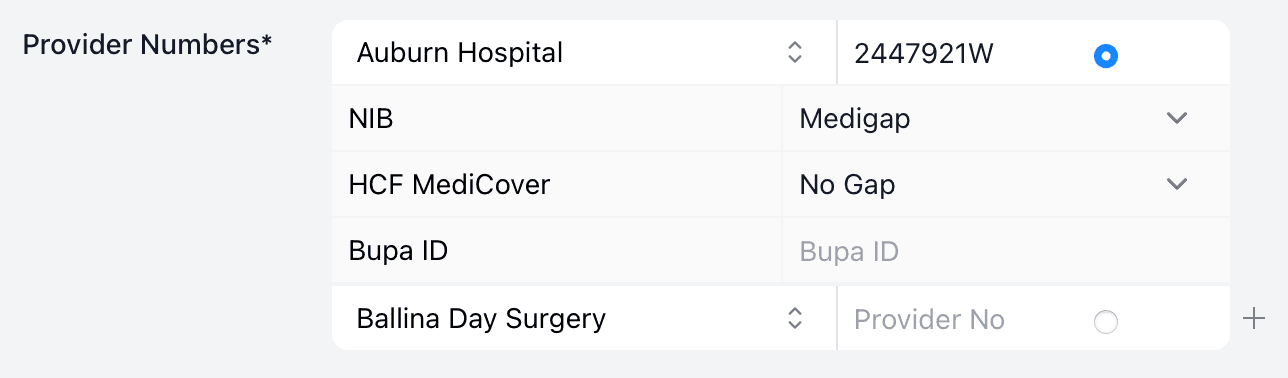
| Column | Example | Purpose |
|---|---|---|
| Location / Facility | Harbourview Private Hospital | Identifies the site or fund (e.g., HCF MediCover, Bupa) |
| Provider Number | 4123ABK / 4123ADF | Location-specific provider identifier used on claims |
| Arrangement | Gapsure / Known Gap | Indicates fund gap arrangement or scheme |
| Default selector | Radio button | Marks the primary provider number for the billing context |
| Reorder | Drag handle | Order rows to mirror preferred selections |
How to update:
- Enter the exact provider number for each facility or fund record.
- Set gap arrangement tags (e.g., Gapsure, Known Gap) to match contracts.
- Choose one default; change it when submitting under a different site/fund.
- Use the
+control to add more locations or fund-specific numbers.
Map each hospital or fund location to its correct provider number.
Gap and prepay preferences
| Field | Type | Example | Purpose |
|---|---|---|---|
| AHPRA Number | Text | MED0002000000 | Registration ID (mandatory) |
| Accept $500 Gap | Toggle | Yes | Enable fixed-gap charging |
| Prepay Uninsured/Cosmetic/Overseas | Toggles | Yes | Collect prepayments before service |
| Early Payment Discount % | Numeric | 10 | Discount for fast payment |
| Discount Duration (days) | Numeric | 7 | How long the discount applies |
| Discount Cap ($) | Numeric | 41 | Maximum discount amount |
Billing Rules tab
| Field | Type | Example | Purpose |
|---|---|---|---|
| Default Billing % AMA | Numeric | 60 | Baseline AMA percentage |
| Uninsured Rate (AUD) | Numeric | 47 | Base charge for uninsured |
| Scenario rules | Rows | NOGAP / GAP / AMA 65% | Overrides for procedures or surgeons |
| Conditions | Text | "VIC", surgeon name, procedure | Targets rules to specific contexts |
Order rules from most specific to general. Save after edits to keep overrides active.
Lists tab
| Field | Type | Example | Purpose |
|---|---|---|---|
| Facility | Dropdown | Newcastle Private Hospital | Where the list runs |
| Surgeon | Dropdown | Dr Casey Morgan | Surgeon linked to the session |
| Start / End | Time | 07:00–17:00 | Session window |
| Recurrence | Text | EVERY 4 ON WE | Roster cadence |
Keep list times aligned with hospital theatre allocations to avoid booking conflicts.
Archive
- Use Archive only when the provider has left the group
- Select Yes to confirm; choose No to cancel
Archived providers cannot be assigned to new cases or lists. Unarchive first if you need to reactivate them.