
Medicare Benefits Schedule
View and update MBS item fees for anaesthetic billing
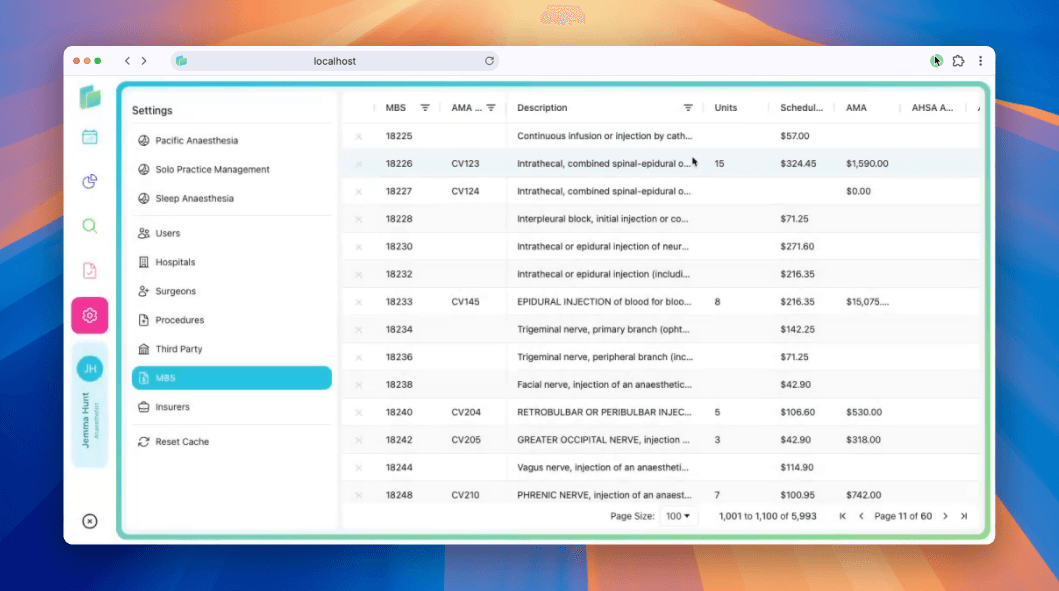
Billumbra maintains a global Medicare Benefits Schedule (MBS) that reflects current anaesthetic item fees. The schedule is automatically updated when Medicare publishes new changes.
Automatic updates
Billumbra syncs with the official MBS database to keep item fees current. When Medicare releases updated fee schedules, Billumbra automatically applies the changes across all practice groups. You don't need to manually import spreadsheets or update individual items.
Updates typically occur within 24 hours of Medicare publishing new rates. You'll see the updated fees reflected immediately when you add items to a case.
Manual fee adjustments
While Billumbra keeps the schedule current, you may need to override specific item fees to match custom practice agreements or health fund contracts.
Open Settings
Click the pink gear icon on the left side of the screen.
Navigate to MBS
Select MBS from the settings menu to view the full fee schedule.
Edit a fee
Click directly into the fee field for any item in the datatable. Type the new amount and click outside the field or press Enter. Billumbra saves the change automatically when the field loses focus.
Manual fee overrides are saved at the practice group level. If you have multiple groups, you'll need to update fees separately for each one.
Editing item descriptions
You can customize the description for any MBS item to better match your practice's terminology or provide internal clarification.
Locate the item
Use the search bar to find the item number or scroll through the table.
Edit the description
Click directly into the description field for the item. Update the text as needed.
Save changes
Press Enter or click outside the field to save. Billumbra automatically stores the updated description.
Custom descriptions appear in quotes, invoices, and internal reports. They don't affect ECLIPSE submissions.
Search and filter items
Use the search bar at the top of the MBS table to quickly find specific items by:
- Item number (e.g.,
17610) - Description keywords (e.g.,
induction,epidural) - Category or group
The datatable displays item numbers, descriptions, Medicare fees, and rebates from insurers.