
Overseas Claim
Lodge overseas specialist claims through ECLIPSE
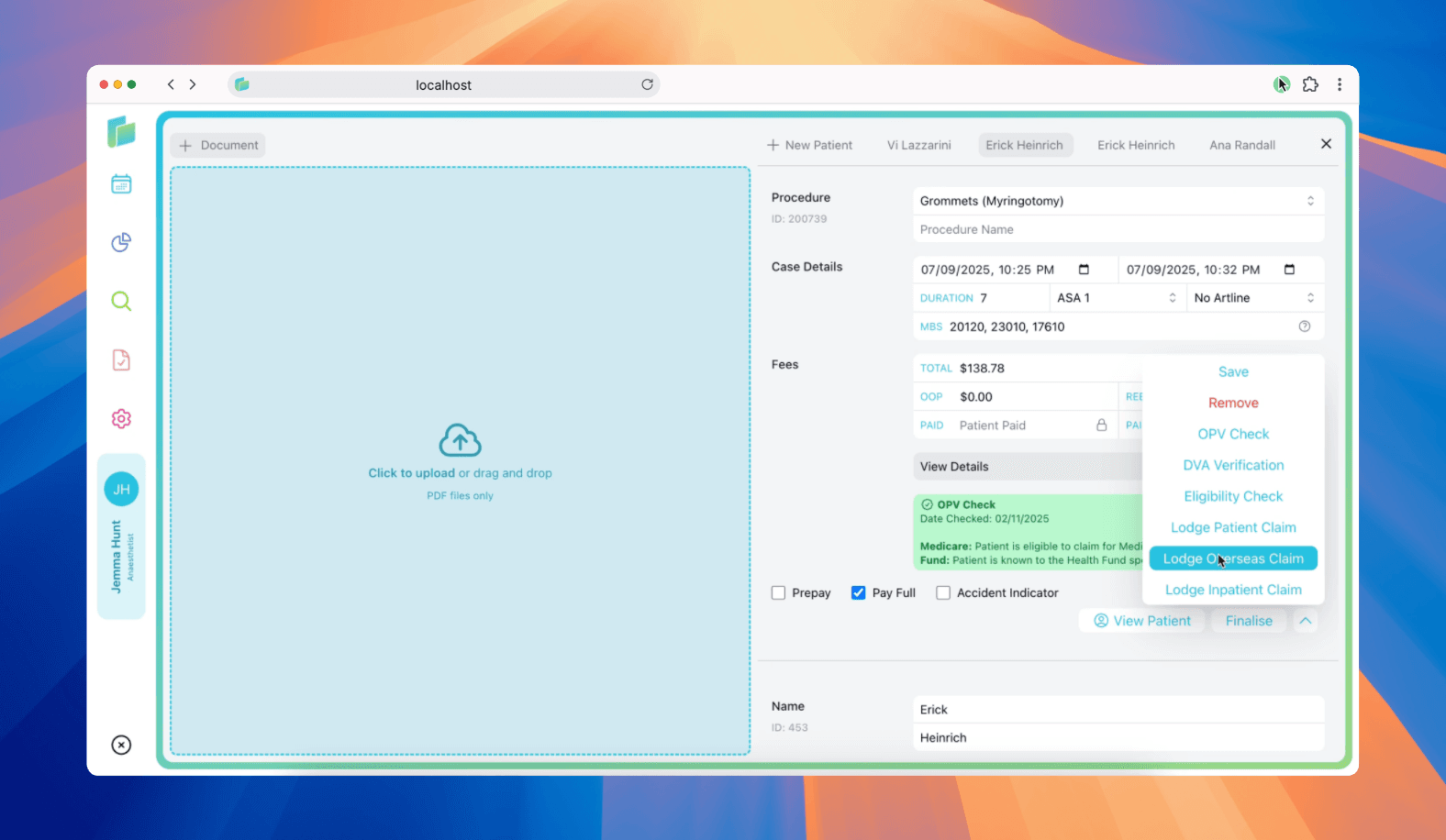
Lodge an overseas claim
Billumbra submits overseas specialist claims to health funds through the OVSW (Overseas Claim Web Service). These claims are processed when patients receive anaesthetic services outside Australia.
Submit an overseas claim
Open the patient record
Navigate to the patient case from the calendar or search.
Click the dropdown button
Click the down arrow to view claim options.
Click Lodge Overseas Claim
Submit the claim for health fund assessment.
Complete the patient's health fund details before lodging. Overseas claims require valid health fund membership for processing.
Understanding claim statuses
When you lodge an overseas claim, Billumbra returns one of these statuses:
| Status | What it means |
|---|---|
SUCCESS | Claim accepted for processing. Health fund status code is 0 or PVO unavailable. |
HEALTH_FUND_REJECTED | Health fund rejected the claim. Check the 4-digit error code for the reason. |
RECEIVED | Claim received and accepted for processing. |
HEALTH_FUND_VERIFIED | Health fund verification completed successfully. |
HEALTH_FUND_ASSESSING | Health fund is currently assessing the claim. |
COMPLETE | Assessment finished. Full report available via the report viewer. |
Processing reports
Retrieve the completed report when the claim shows COMPLETE status. The report includes:
Claim assessment
| Field | Description |
|---|---|
| Assessment code | A (Accepted), R (Rejected), W (Warning), or C (Complete - PC) |
| Explanation code | 4-digit code from the health fund |
| Explanation text | Plain text describing the assessment outcome |
Service-level detail
For each service in the claim:
| Field | Description |
|---|---|
| Service ID | Your identifier for the service |
| Assessment code | A, R, or W for this specific service |
| Benefit | Amount the fund will pay (in cents) |
| Charge amount | What you charged for the service |
| Schedule fee | The health fund's schedule fee for this item |
| Item number | MBS item code |
| Date of service | When the service was rendered |
| Explanation | Fund's reason code and text for the service assessment |
If the claim was rejected at the PVO (patient verification) stage, health fund assessment details won't be returned. Fix the verification issue and resubmit.
Troubleshooting overseas claims
Quick reference: Assessment codes
| Code | Meaning | Action required |
|---|---|---|
A | Accepted | None>fund will pay the benefit |
R | Rejected | Review explanation code and fix the issue |
W | Warning | Claim processed but review the explanation for future claims |
C | Complete (PC) | Processing complete through private channel |
Common response errors
| Error code | Message | How to fix |
|---|---|---|
| 3004 | Unexpected error occurred | Contact Medicare eBusiness Service Centre on 1800 700 199 |
| 3040 | Health fund system unavailable | Wait and resubmit when fund's system is back online |
| 3045 | Health fund response invalid | Fund's response couldn't be processed>try again or contact support |
| 9007 | Location not authorised | Your practice location isn't authorised for this function>call 1800 700 199 |
| 9011 | Billing agent not recognised | Billing agent doesn't belong to your location>verify your setup |
| 9671 | Fund doesn't accept transmissions | This health fund doesn't support ECLIPSE overseas claims |
| 9672 | Fund information out of date | Update your health fund list in Billumbra settings and resubmit |
| 9777 | Duplicate transaction ID | You've already submitted this claim>use a unique transaction ID if resubmitting |
Health fund status codes
When HEALTH_FUND_REJECTED is returned, check the 4-digit health fund status code:
- Review the status text explanation
- Common issues include invalid membership, service not covered, or missing patient details
- Correct the issue in the patient record or claim details
- Resubmit with updated information
Service-level rejections
If the overall claim shows COMPLETE but individual services have assessment code R:
- Check each service's explanation code: Identifies which fund rule was violated
- Review schedule fee vs charge: Ensure your charge aligns with fund requirements
- Verify item eligibility: Confirm the MBS item is covered for overseas claims
- Check service date: Some funds have time limits on overseas claim submissions
Services with assessment code A will still be paid even if other services on the same claim are rejected. Review the benefit amount for each accepted service.
Resubmitting overseas claims
Review the rejection reason
Open the processing report and note the error code or assessment explanation.
Correct the issue
- Update health fund membership details
- Verify patient eligibility
- Adjust item numbers or service dates
- Complete missing required fields
Lodge a new claim
Return to the patient record and resubmit an overseas claim. Billumbra generates a new transaction ID automatically.