
Reports
Track claim status and payment reconciliation for DVA claims
Billumbra retrieves processing and payment reports from DVA through the DVRW (processing) and DVYW (payment) web services. These reports help you track claim status, identify rejections, and reconcile payments.
Processing Reports (DVRW)
Processing reports show the status of DVA claims you've submitted, including acceptance, rejection, or pending review.

What you'll see in a processing report
When status shows COMPLETE, the report includes:
| Field | Description |
|---|---|
| Status | COMPLETE, REPORT_NOT_READY, REPORT_NOT_FOUND, or REPORT_EXPIRED |
| Benefit paid | Total benefit paid for all services in the claim (in cents) |
| Charge amount | Total amount charged for all services in the claim |
| Claim ID | Unique identifier assigned by DVA to the claim |
| Service details | Each service shows item number, benefit paid, charge amount, and assessment code |
| Medical event | Event date and ID for each service occasion |
| Patient status | Veteran file number and any updates to patient details (e.g., name changes) |
| Provider number | The provider who submitted the claim |
If patient details were updated by DVA during processing (code 8025), Billumbra will flag the changes so you can update your records for future claims.
Processing reports are typically available within 24-48 hours of claim submission. Billumbra automatically updates your case records when new reports arrive.
How to view processing reports
Open the patient record
Navigate to the patient case from the calendar or search.
Check claim status
The DVA claim panel displays the current status.
Processing Report
Click the Processing Report button to view the report.
Payment Reports (DVYW)
Payment reports confirm that DVA has remitted payment for accepted claims. Billumbra matches incoming payments to your case records and updates the paid status automatically.
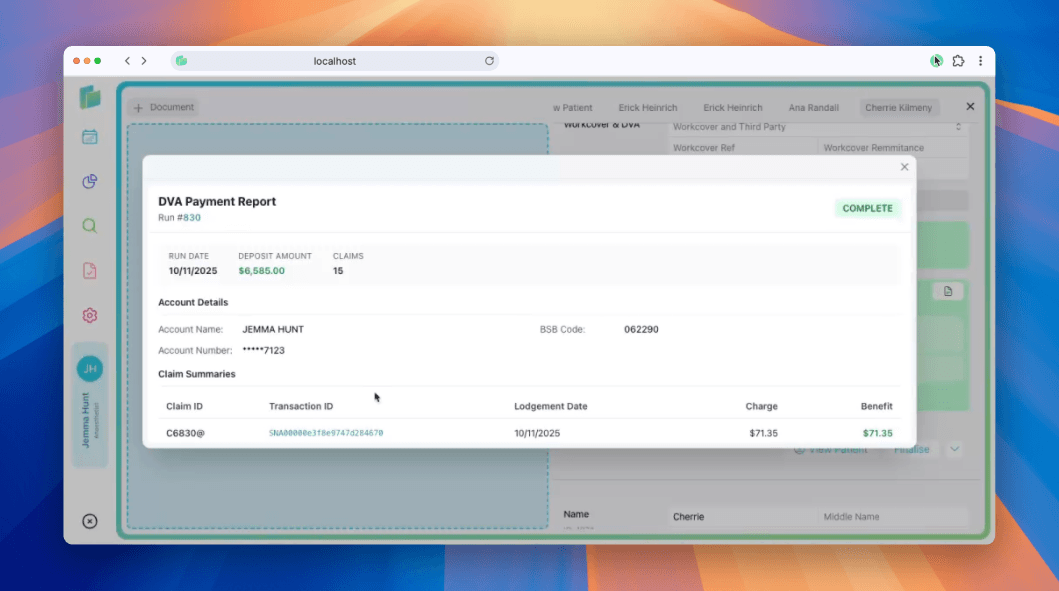
What you'll see in a payment report
When status shows COMPLETE, the report includes:
| Field | Description |
|---|---|
| Deposit amount | Total Medicare benefit deposited (shown in cents) |
| Payment run date | Date Services Australia requested the payment from RBA |
| Payment run number | Unique identifier for the payment batch |
| Account details | Last 4 digits of your bank account (e.g., *****1234) and BSB |
| Benefit amount | Total benefit paid for all services in the claim |
| Charge amount | Total amount charged for all services in the claim |
Check your bank account and Billumbra's payment report to confirm receipt of payment.
How to view payment reports
Open the patient record
Navigate to the patient case from the calendar or search.
Check claim status
The DVA claim panel displays the current status.
Payment Report
Click the Payment Report button to view the report.
Report statuses explained
When you check a DVA claim, you'll see one of these statuses:
| Status | What it means |
|---|---|
COMPLETE | Processed, paid, and finalized. View full payment details. |
REPORT_NOT_READY | Claim found but still processing. Check back in 5-10 business days. |
REPORT_NOT_AVAILABLE | Claim was rejected. Check the processing report for the reason. |
REPORT_NOT_FOUND | Report can't be retrieved, see possible causes below. |
REPORT_EXPIRED | More than 6 months since lodgement. Reports expire after this time. |
Why REPORT_NOT_FOUND appears
REPORT_NOT_FOUND can happen for several reasons:
- The claim was lodged through a different system (not via web service)
- Provider number in the request doesn't match the original claim
- A different device or location submitted the claim originally
- The correlation ID doesn't exist in DVA's records
Billumbra handles correlation IDs and provider details automatically. If you see this status, verify the claim was successfully lodged.
Troubleshooting common statuses
| Status | How to resolve |
|---|---|
REPORT_NOT_READY | Normal for new claims. DVA needs 5-10 business days to process. Billumbra will automatically retrieve the report once ready. |
REPORT_EXPIRED | Reports older than 6 months aren't available. Check your bank statements or contact DVA for historical records. |
REPORT_NOT_AVAILABLE | Claim was rejected. Open the processing report to see the reason code. Common causes: invalid veteran number, item not covered by DVA, or service date beyond 90 days. Resubmit corrected claims within 90 days of the service date. |
Always verify the veteran file number before lodging a claim.