
Inpatient Claim
Lodge inpatient medical claims through ECLIPSE
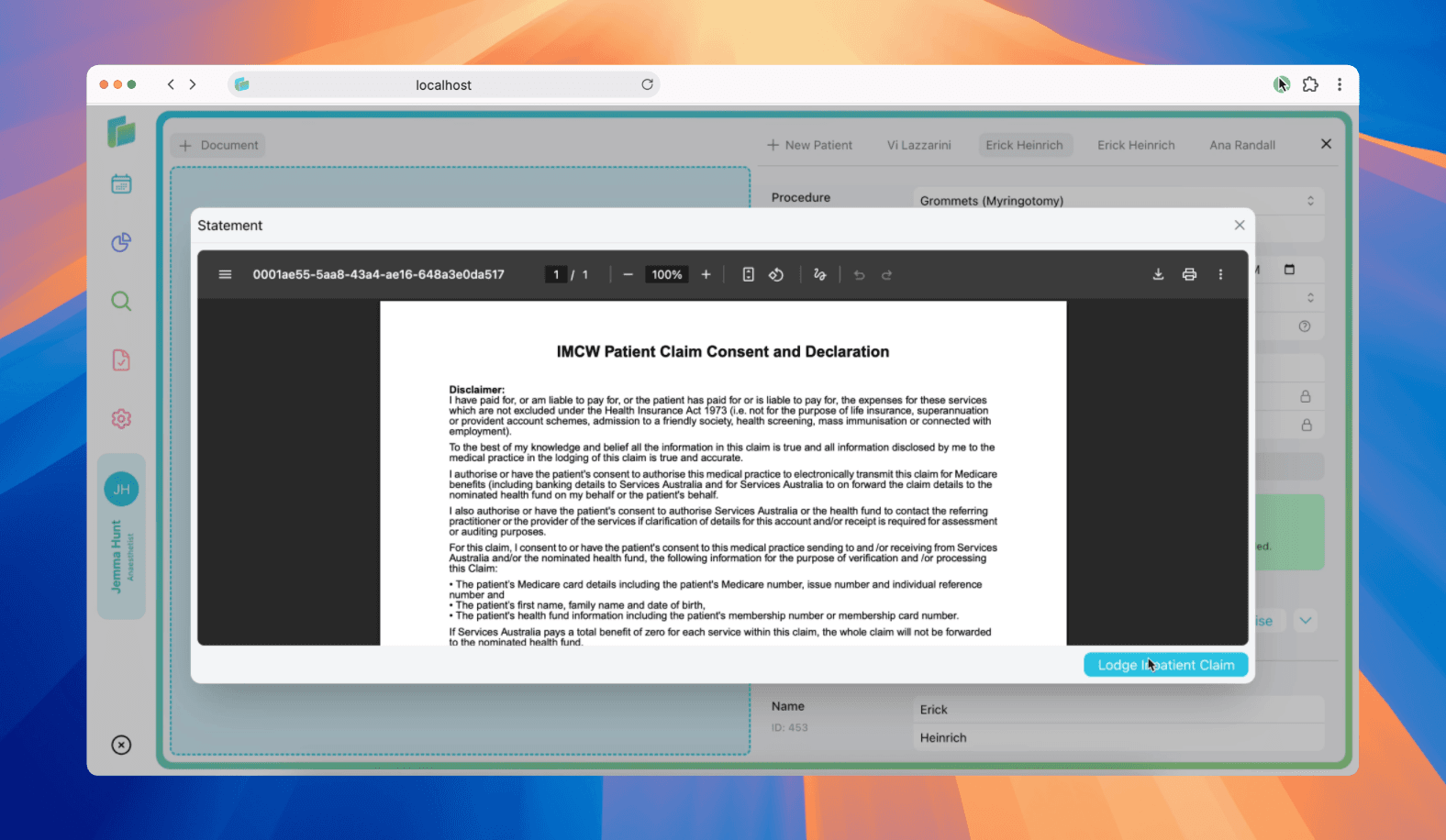
Lodge an inpatient claim
Billumbra submits inpatient medical claims (IMCW) through ECLIPSE for both Medicare and health fund processing. These claims cover anaesthetic services provided during hospital admissions.
Submit an inpatient claim
Open the patient record
Navigate to the patient case from the calendar or search.
Click the dropdown button
Click the down arrow to view claim options.
Review the consent declaration
The IMCW Patient Claim Consent and Declaration appears. Review, download, or print as needed.
Click Lodge Inpatient Claim
Submit the claim for Medicare and health fund assessment.
The consent declaration includes important patient agreement terms. Ensure the patient has provided informed financial consent before submitting.
Agreement and Scheme Claims
Schemes and Agreements are separate claim processing classes and submitting a claim using the incorrect processing class may result in a declined eligibility check or claim. If in doubt, check with the PHI and your contract for the correct claim processing class.
Schemes
Used for most No Gap and Known Gap programs where a provider has directly enrolled with a PHI. This can include:
- No Gap cover: where the patient doesn’t have any out of pocket expense.
- Known Gap cover: where the patient has an out of pocket expense and the provider must provide written Informed Financial Consent.
Agreements
Usually where an organisation – a hospital or medical group - has signed an agreement with a fund. This includes:
- Hospital Purchaser Provider Agreement/Practitioner Agreements (HPPA/PA): the combination of agreements between the practitioner and the hospital, and between the hospital and a PHI.
- Medical Purchaser Provider Agreements (MPPA): an agreement between the practitioner and the PHI. Normally reserved for No Gap diagnostic services providers, hospitals and billing agents who represent pathology and radiology services.
Agreements may also permit No Gap and Known Gap billing arrangements.
Understanding claim statuses
When you lodge an inpatient claim, Billumbra returns one of these statuses:
| Status | What it means |
|---|---|
SUCCESS | Claim accepted. Medicare and/or health fund status codes are 0, or verification unavailable. |
RECEIVED | Claim received and accepted for processing. |
MEDICARE_VERIFIED | Medicare patient verification completed. |
MEDICARE_REJECTED | Medicare rejected the claim. Report available with reason codes. |
MEDICARE_ASSESSING | Medicare is currently assessing the claim. |
HEALTH_FUND_VERIFIED | Health fund patient verification completed. |
HEALTH_FUND_REJECTED | Health fund rejected the claim. Report available with reason codes. |
HEALTH_FUND_ASSESSING | Health fund is currently assessing the claim. |
HEALTH_FUND_UNPROCESSED | Medicare assessment complete; waiting for health fund assessment. |
COMPLETE | Both Medicare and health fund assessments finished. Full report available. |
REQUESTED_DELETE | Provider requested this claim be deleted (PC claims only). |
SUCCESS doesn't mean the claim is fully processed, it means the claim was accepted for assessment. Check back for COMPLETE status to view final results.
Troubleshooting inpatient claims
Quick reference: Assessment codes
| Code | Meaning | Action required |
|---|---|---|
A | Accepted | None, benefit will be paid |
R | Rejected | Review explanation code and fix the issue |
Medicare rejections
When MEDICARE_REJECTED is returned:
| Issue | How to fix |
|---|---|
| Invalid Medicare card | Verify patient's card number and IRN match Medicare records |
| Patient eligibility | Check patient is eligible for the service date and item codes |
| Expired card | Patient must update Medicare card before resubmitting |
| Item restrictions | Review MBS restrictions for the item (age, frequency, location) |
| Service date issue | Ensure service date falls within allowable claiming period |
What you'll see: Medicare status code and text explaining the rejection. Check the service-level explanation codes for specific item issues.
Health fund rejections
When HEALTH_FUND_REJECTED is returned:
| Issue | How to fix |
|---|---|
| Patient not covered | Verify health fund membership and coverage dates |
| Service not covered | Check item is covered under patient's hospital policy |
| Missing admission details | Complete all required admission and discharge information |
| Scheme/agreement error | Verify you're using the correct processing class (scheme vs agreement) |
| Pre-authorization required | Some services require prior approval from the fund |
What you'll see: Health fund status code and text at the claim level. Service-level assessments show which specific items were rejected.
Services with assessment code A will be paid even if other services on the same claim are rejected. Review each service individually.